
Download BMI Log – BMI Tracker, Health Monitoring, Weight Management, Fitness Tool
Overview
BMI Log is a streamlined desktop application designed to help users track their Body Mass Index (BMI) with minimal effort. The software enables users to input their height and weight to receive immediate BMI calculations, providing a quick snapshot of their current health status. It is tailored for individuals who prioritize wellness and want to maintain consistent health monitoring as part of their daily routine.
The app is particularly suited for those managing weight, aiming for fitness goals, or simply seeking a better understanding of their body composition. While the developer, A11y Software, is known for accessibility-focused tools, the specific technical background of the company was not detailed in the provided information. The application supports the tracking of historical BMI data, allowing users to visualize trends over time and assess progress.
It is ideal for use in personal health management, fitness planning, or as a supplementary tool for health professionals advising clients. The intuitive design ensures that users can perform calculations and review records without requiring prior technical knowledge.
Key Features & Capabilities
- Instant BMI Calculation – Enter height and weight values to receive an immediate BMI result based on standard medical formulas. This feature supports quick health assessments during daily check-ins.
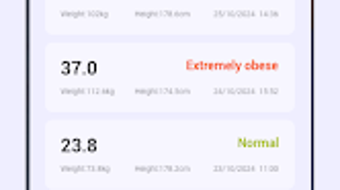
- Historical Data Tracking – The software maintains a record of past BMI entries, enabling users to view trends and monitor changes over time through visual summaries.
- User-Friendly Interface – Designed with simplicity in mind, the interface allows users to navigate the app with minimal steps, reducing friction during data entry and review.
- Progress Visualization – Users can access visual charts or graphs to interpret BMI trends, aiding in long-term health planning and motivation.
- Offline Functionality – The application operates without requiring an internet connection, ensuring data privacy and uninterrupted access.
Practical Usage Examples
Users can leverage BMI Log to set personal health benchmarks, track progress after starting a new diet or exercise regimen, or share data with healthcare providers during consultations. The app is especially useful for individuals managing weight-related goals or those who prefer a low-effort method of health monitoring. Its ability to store multiple entries over time supports consistent self-assessment, making it a reliable companion for long-term wellness strategies.
User Interface, Workflow & Performance
The user interface of BMI Log is structured around simplicity and clarity. Core functions—such as entering height and weight—are accessible through clearly labeled fields, with the result displayed immediately below. Navigation is linear and intuitive, minimizing the number of steps required to complete a task.
The workflow is optimized for speed and ease, allowing users to input data and review past records with minimal interaction. The developer did not specify resource usage details, so exact performance metrics such as CPU or RAM consumption remain unknown. However, based on the app’s lightweight size of 12.4 MB and its focus on basic calculations, it is expected to operate efficiently on most modern devices.
Stability is assumed to be consistent, given the app’s limited scope and functionality. No performance issues were reported in the provided data, but general software behavior patterns suggest smooth operation under normal usage conditions.
Compatibility & System Requirements
BMI Log is designed for Android operating systems, with version 1.0 released on May 15, 2024. The application has a file size of 12.4 MB, indicating a lightweight footprint. Platform compatibility information is limited to Android, with no details provided on specific device models or hardware requirements.
The developer did not specify additional system requirements, such as minimum RAM or processor speed. Exact compatibility details were not listed, and no information was provided regarding support for older or newer Android versions. Users are advised to ensure their device meets standard Android system standards for app installation.
Pros and Cons
Pros
- Free to download and use with no in-app purchases
- Simple, intuitive interface suitable for all age groups
- Instant BMI calculation with no need for external tools
- Offline functionality ensures privacy and accessibility
- Tracks historical data for long-term progress monitoring
Cons
- Limited to BMI tracking; no additional health metrics (e.g., body fat percentage)
- No integration with wearable devices or health platforms
- Platform is restricted to Android; no desktop or iOS version available
- Exact system requirements were not specified
- Limited visual customization options
FAQ Section
Is BMI Log available for Windows or Mac?
BMI Log is currently designed exclusively for Android devices. There is no desktop version available for Windows or Mac at this time.
Is the app safe to use and does it collect personal data?
The application operates offline and does not require internet access, which reduces the risk of data transmission. However, the developer did not provide a detailed privacy policy, so users should assume that data is stored locally on their device.
Can I update BMI Log on my Android device?
Yes, users can update the app through the Google Play Store or official distribution channels when a new version is released.
Does BMI Log require an internet connection?
No, BMI Log functions fully offline. All calculations and data storage occur locally on the device.
What type of license does BMI Log use?
BMI Log is distributed as free software with no cost to users. The specific license type was not disclosed in the provided information.
Final Thoughts + CTA
BMI Log offers a focused, no-frills solution for individuals seeking to monitor their Body Mass Index with ease. Its straightforward design, instant calculation feature, and offline operation make it a practical tool for health-conscious users. While it lacks advanced health tracking capabilities and platform versatility, its core functionality is reliable and accessible.
The app is best suited for users who value simplicity and privacy in their health monitoring. For those looking to track BMI trends over time without complexity, BMI Log delivers a dependable experience. Download BMI Log now to take control of your health journey with confidence.







